development development .

development

What are the types of security?What is the main and important type of security?

Computer security includes providing security for various parts that are related to a computer, including hardware, software, network, electronic data, etc., all of which must be protected by strategies, so as not to harm any of the sectors and also not to be attacked by hackers, there are different types of computer security, all of which have the same purpose and do their best to ensure that the site has no security holes and hackers cannot penetrate the site and abuse the important information that may be on that site, site security and hacking are among the topics that are always considered by users, and a large number of keywords related to these topics are often entered by users in the search section of search engine to be able to get the answer to their questions about this field, but again there are still some questions which are created in the user's mind after reading each article, so if you still feel the need to know more about site security, hacking, etc., after reading this article, make sure that you will get the desired answers by visiting our website www.dotnek.com which contains more articles about these topics.

In this article, we try to mention different types of computer security in general, so that you can get acquainted with each one separately.


Types of computer security:
1- Application security:
Application security includes all the measures that find the security holes in the programs and try to fill them and increase the security of the programs as much as possible, of course, most of these measures are done during the development of programs , or you can create tools to protect applications, there are many tools that can help you establish application security and achieve your goal.

In fact, it is always possible to make small or big mistakes while developing or running programs, the most important thing is to solve all the problems as soon as possible through the available tools, so that you can protect your website from hackers and don’t let them use this situation to achieve their desired result.

Application security tools:
This type of security has many tools, two of the most important of them are security testing tools and application shielding products, which we will discuss in the following.

Security testing tools include:
- Static testing:
It allows developers to analyze code correctly and in the right places while developing applications, so that a mistake does not cause security problems for the site in the future.

- Dynamic testing:
In this section, the code is analyzed during execution, and it is possible to examine the attacks that may occur in a more complex way.

- Interactive testing:
This is a combination of the previous ones.

- Mobile testing:
Mobile phones are very important these days and are mostly used more than any another device, and the security of all the apps in it, is important to users, which allows you to check how apps on your mobile phone are being hacked, if you have mastered all these things, you can check the security step by step and protect your information from hackers.

Now it is time to take a look at application shielding products and get familiar with it:

Application shielding products include the following categories:
- RASP:
Runtime application self-protection is very important and many programs use this tool, one of the features that this tool provides for the program is that if a problem occurs, the program will be disabled automatically.

- Code obfuscation:
Protecting code against hacker attacks is so essential, which is possible through code obfuscation.

- Threat detection tools:
These tools examine all possible threats, and through these tools, you are able to create higher security .

2- Information security:
IS stands for information security which is a type of computer security that protects personal and confidential information, and all efforts in this type of security is to keep personal information from being accessed by hackers, information security is based on three basic principles, which are confidentiality, integrity and availability, and there must be at least one of them in order to establish information security, here we are going to explain these factors briefly.

Confidentiality:
This principle of information security means that the personal information should be kept secret from others and should not be shared with anyone in any way.

Integrity:
This principle implies that all the information contained in the computer must be integrated and great you must pay more attention to updating each piece of data.

Availability:
Availability means that all needed information, should be available and can be used easily and quickly.

Another issue that is important in the field of information security which you need to be familiar with is non repudiation, which means that a person who sends a mesغير مجاز مي باشدe cannot deny sending it, and vice versa, the person who receive the mesغير مجاز مي باشدe cannot repudiate it, and pretend that the mesغير مجاز مي باشدe was not sent to him/her, which leads to security.

3- Network security:
One of the most important types of computer security is network security, which means that all efforts are made in this field to create conditions in which all information is stored, as a result, hackers cannot use the information illegally.

Different types of network security:
- Physical Network Security:
In this type of network security, as its name implies, all the necessary facilities are provided to protect the information, which may include, alarms, locks, safe rooms to place computers containing important information, etc., all of which It is done, so that hackers cannot access the information.

- Technical Network Security:
In this type of security, the data that exists in the computer and also the one that is being transferred, in other words, all available information is protected.

- Administrative Network Security:
All users who have access to computers should be monitored and their access to information should be checked regularly, so that malicious activities do not cause serious problems.

In general, network security is essential, and in order to do it properly, steps must be taken, some of which we will mention in the following section.

Different ways to create network security:
- Antivirus and antimalware software:
These pieces of software are so important in establishing network security and the best type of them, check the new information right after entering, and also check them continuously to prevent viruses, worms, ransomware, etc., and let you know whether they exist or not, so they cannot damage your computer.

- NAC:
If you allow access to all parts of the network to many people, you won’t be able to ensure the confidentiality of your information and network security may be in danger, so people should have limited access to the entire network, and you should only allow specific people to access all the information.

- Firewall Protection:
Network traffic control is of a great importance, and firewall protection monitors network traffic that is a kind of threat for network security, it identifies software that intends to enter and disrupt your network via the Internet, and block their access to the network.

- Email Security:
This allows access to emails to be monitored and controlled.

- Mobile Device Security:
Nowadays, mobile phones are so popular and important for users, and they do not want to face problems such as being infected by viruses, etc., in their mobile phones, so it is necessary to have enough control over this field, so that if problems occur, you can solve them and do not make your information available to hackers.

There are several ways to get rid of viruses that infect mobile phones, for example, you shouldn’t Browse unsecured websites TIPS , you should use the right password, try to update programs regularly, etc., all of these ways can prevent the virus from entering your mobile phone and infecting it.

4- Endpoint security:
A device may be remotely connected to your network, which may make it difficult to maintain the security, as it will increase the possibility of hacking , viruses, etc., thus if you need to connect with different devices to the network, take this type of security seriously.

5- Internet security:
Internet security covers a wide range of measures that are taken to protect computer systems connected to the Internet, as well as the security of the browser.


Last word:
In general, computer security is of a great importance, and it is like a branching tree, all of which are to provide security for your computer, in this article, we have briefly described the types of computer security, so that you can use this information to keep your data secure.

Source:https://www.dotnek.com/Blog/Security/what-are-the-types-of-securitywhat-is-the-mai

Youtube:https://youtu.be/86dv-z_zJ5k


برچسب: ، app، application، mobileapp، mobileapplication، mobile، DotNek، monetizing، development، programming، developer، Xamarin، android، Ios، revenue،
ادامه مطلب
امتیاز دهید:
رتبه از پنج: 0
بازدید:

+ نوشته شده: ۲۸ خرداد ۱۴۰۰ساعت: ۰۳:۳۴:۲۲ توسط:Media موضوع: نظرات (0)

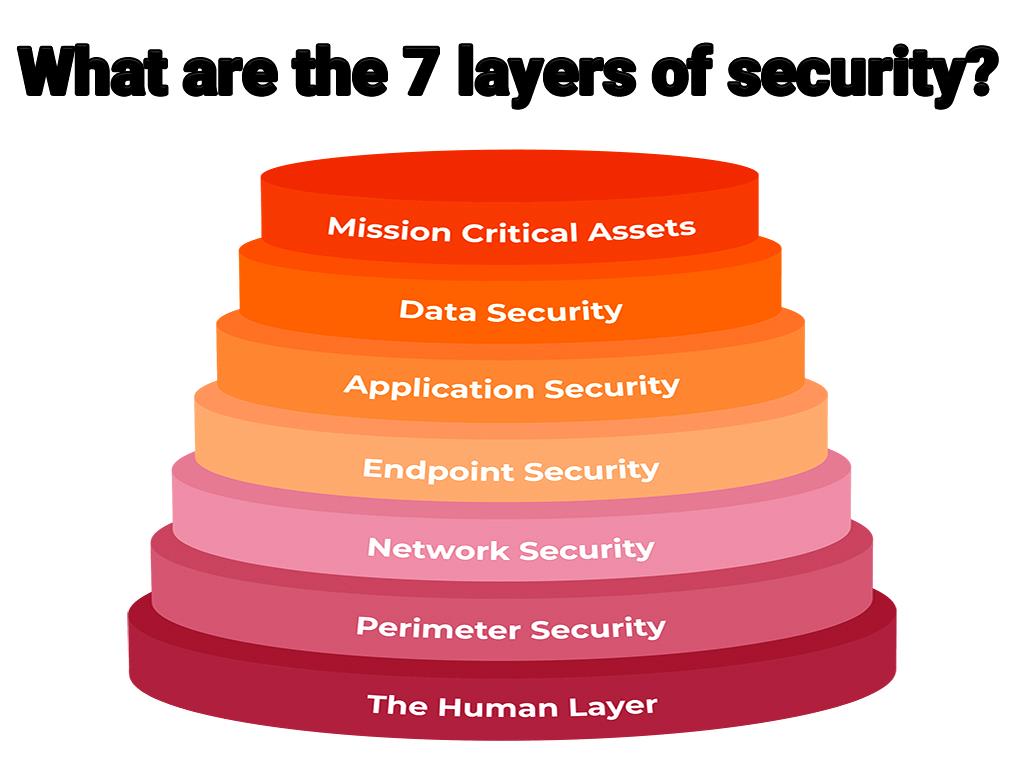
What are the 7 layers of security?

Security is an important factor for people all over the world due to the existence of important information which may be stored on the computer or any other system, so you have to provide different facilities to protect this information and not allow others to access it, in the world of computers, security has many details, and to understand each of them, at the beginning, you need to be fully aware of the computer in general, so that you can maintain the security of your site better, security has 7 layers, which we will discuss in the following.


7 layers of security:
1- Information Security Policies:
One of the main layers of information security is Information Security Policies, which gives users the assurance that you give a value to their information and do your best to protect them, the security plans for people who want to protect information must be prearranged and should have a step-by-step process to strengthen the security of your site.

In general, information security policies reflect the thoughts of the media and show all their efforts to protect information, through this layer of security , information can be secured against all existing threats.

This layer of security has 3 main types that we will mention in the following:
- Organizational (or Master) Policy

- System-specific Policy

- Issue-specific Policy

2- Physical Security:
This layer of security is always an important for many people, and they regularly provide facilities through which they can establish physical security to protect information, in the real world, if you have a valuable object, such as money, jewelry, documents, etc., you maintain this layer of security as fully as possible, for example, if you leave that valuable object in a safe place, or give it to someone who you trust, you are not worried about protecting them.

The same thing is also true for computers, generally, physical security is defined as the protection of hardware and software components, networks, and data from natural physical conditions and events, which may cause serious damage to an organization and the information contained in them, in other words, physical security includes all measures to protect all hardware, information and software available against theft, natural disasters, etc., in order to achieve this kind of security, you must pay attention to some tips which help you keep your information safe.

There may be different tips about the ways of establishing this layer of security which are different from each other, to establish this layer of security, you may choose a safe room with CCTV cameras, or restrict the access of different people to this room, which can also help you in protecting important information and other solutions that exists to ensure you that physical security is set up properly, it should also be noted that different there are different threats for this section, including, abnormal weather conditions, pouring coffee on the computer, people who target your information, etc., to establish security for each of these threats, certain principles are required.

3- Secure Networks and Systems:
This layer of security is very widespread, which includes all measures, equipment, etc., which cause the security of the system and the network to be integrated, and prevent any threatening factors from entering your system, and ultimately provide security for you.

Network security has 3 types, which we are going to discuss in the following.
- Physical Network Security:
This type of network security control is to protect information and prevent illegal access to the system.

- Technical Network Security:
This type is so important and protects all the data that is in the computer, including the one that is being transferred from the computer or the data that is entering the computer, in order to establish the security of this layer, you must pay attention to many points.

- Administrative Network Security:
As you know, the behaviors of users who have access to information, cannot be controlled, and you must provide facilities in advance, so that you can prevent any event that affects the security structure of the network, one of the things that can be done in this section, is restricting people's access to all information, which is an effective way to prevent a series of unfortunate events.

In general, in this layer of security , you can do the following:

- Network Access Control

- Antivirus and Antimalware Software

- Firewall Protection

- Virtual Private Networks

_...

4- Vulnerability Programs:
Despite the spread of cyber attacks and loss of information which they cause, and the daily progress of hackers, security layers have received more attention from users, and they try to study and search in this field to have control over each layer and implement all the necessary strategies to protect their information, hackers are constantly scrutinizing the weaknesses of a system and use these weak points to attack the system and its information, so they get their desired results through them.

In this layer of security, you must pay more attention to the vulnerabilities of a system, all of these weak points have to be identified through various tools, then you should try to do your best to solve the problem because that weak points must be strengthened in order to increase security in general, so you can improve your system security by paying attention to all points.

5- Strong Access Control Measures:
This layer of security has a great impact on establishing security in general, and all the actions that are taken in this layer, ultimately, are aimed at controlling people's access to information, to achieve this goal, various solutions can be taken, including the solution of setting passwords which are hard to be guessed, which should include more than 8 characters, so it is hard for people to guess this password, as a result they cannot access your information easily.

This layer of security contains the following 3 types:
- Discretionary Access Control (DAC)

- Managed Access Control (MAC)

- Role-Based Access Control (RBAC)

6- Protect and Backup Data:
This layer of security helps you to have no worries about the stored information, and it is constantly recommended in this layer to provide backup information, so that in case of unexpected events, your information won’t be damaged and will be protected as much as possible, there are a number of ways you can get help from them in order to implement this layer properly, including keeping information in a safe place other than the current information system that helps you maintain your information safe. It should be noted that it is necessary to establish the security for the information from which you have made a backup.

7- Monitor and Test Your Systems:
In this layer, you should review all the actions you have taken and examine all the aspects, so that you can identify the possible dangers that threaten your information and system, in general, the system monitoring process helps you solve these problems and does not allow a problem to occur, which causes damage to your system or loss of your information.

To implement this layer, there are various tools which will help you achieve your goal, some of which we are going to mention in the following section.

- SolarWinds Server and Application Monitor

- NinjaRMM

- PRTG - OpManager by ManageEngine

- OpenNMS
- WhatsUp Gold

- OpenNMS


Last word:
In general, security layers are of a great importance and each of them has a separate world that in order to be able to create a flawless and integrated security, you must implement all the necessary strategies, we tried our best to provide you with some general information about each of the security layers, as a result, you can finally prevent hackers from accessing your information due to the fact that if they access your personal information, they will try to abuse them which is a big trouble for you, so you can prevent this from happening by mastering all the layers and not let your site be hacked , which help you not to create a bad user experience for your users due to the fact that they are not worried about the loss of their personal information.

Source:https://www.dotnek.com/Blog/Security/what-are-the-7-layers-of-security

Youtube:https://youtu.be/pgPOFx-YLLU


برچسب: ، app، application، mobileapp، mobileapplication، mobile، DotNek، monetizing، development، programming، developer، Xamarin، android، Ios، revenue،
ادامه مطلب
امتیاز دهید:
رتبه از پنج: 0
بازدید:

+ نوشته شده: ۲۸ خرداد ۱۴۰۰ساعت: ۰۳:۲۸:۲۴ توسط:Media موضوع: نظرات (0)

Is Google safe from hackers?

People who have an account in Google search engine are always concerned about whether Google is safe from being hacked and are looking for ways to protect their account from being hacked, hackers try to steal people's information and use them negatively in other words they try to abuse them, so while using Google or any other search engine, you must be careful of hackers and protect your information from them, to stay safe from being hacked by them, you must pay attention to some points which by getting help from them, you can keep yours information safe from these kinds of attacks, we are going to mention the points that should be considered in the following.


- Password:
One of the things you need to keep in mind in order to make it difficult for hackers to access your information on Google is the password that you choose, many people may prefer mobile phone number, child name, year of birth, etc., as the password that they used to log in to their Google account, which can be easily guessed by hackers , as a result, you should change your password and select the one that contains more than 8 characters, and it also uses a combination of letters, numbers, etc., so that the hacker needs to spend more time to reach it.

- Use password alert:
A password is required to log in to different sections as well as accounts in different search engines, sometimes people use the same password for all of these parts, if a person use the same password for all of his/her accounts, the hacker will be able to access all the accounts by hacking one of them, so they must choose a separate one for each of them, to prevent this from happening, you can download a password alert from Chrome, it will alert you if you choose the same password for multiple accounts.

- Manage your passwords with KeePass:
Today, as we mentioned, each person may have multiple user accounts, each of which must provide a separate password due to the points that we have mentioned above, so how do you remember all of them? KeePass and similar tools can help you increase the security of your site and help you not to forget your passwords, so you need to specify a password for KeePass and track all other passwords through it, it even has the ability to choose the passwords automatically.

- Do not open spam emails:
One of the most common ways that hackers can access your account is by sending a spam email to you, in a way that if you open the email and click on the received links, your account will be easily hacked, mesغير مجاز مي باشدes that ask you to give them your personal or bank card information, etc., may be spam emails, and you should be careful of them.

- Update your software:
Software updates help you prevent hackers from hacking your Google Account, if you have software that is not up to date, hackers can easily access your information and hack your account, so that updating Google Chrome is so important, and you should make sure that you are using the latest version available.

- Remove additional programs:
The more apps you install, the more likely you are to be attacked by hackers on your Google account, so remove the apps you do not need in order to increase the security of your account, another point to keep in mind is not to use unknown sources to install the programs you need, because there may be malware that wants to attack your site.

- Use Google Security Settings:
Enable two-step verification, as a result, even if the hacker finds your password, he/she will not be able to access your account, in fact every time you or someone else wants to log in to your account, you will be given a mesغير مجاز مي باشدe that you must confirm in order to login to your account.

- Check important security events in your account:
Google has a feature that allows you to check all the important events related to the security of your account, if you encounter a suspicious item, you can make changes such as changing the password immediately to protect your account and keep your important information safe from hackers .

- Add a recovery phone and email:
To increase the security of your account, you may have to change your password regularly, so there is a possibility that you forget the latest password that you have chosen, so you need to add your phone or recovery email in order to access your account easily, and even if your account is attacked by hackers, you will be able to get it back as soon as possible by getting help from them.

- Delete unknown devices that have access to your account:
You may find out that some devices other than yours have access to your account, or you have logged in to your account from a device before, but now you are no longer logged in through that device, we suggest you to delete these devices immediately, so that hackers cannot access your account through these devices.

- Set up Inactive Account Manager:
One of the features that Google has provided for its users is Inactive Account Manager, through which you can log in to your account even if you don’t have access to it, which help you keep your information, and you are not worry about losing your information anymore.

- Install antivirus:
Your account may be attacked by one of your software programs which was infected by the virus, the solution is that you should install antivirus , which will help you to identify and remove these kinds of software programs quickly, which can help you prevent hacking and keep your account secure.

In addition to the tips that we have taught you in this article, there are other tips that you can follow to avoid being hacked, but in general, there are different ways to hack people's accounts, some of which will be covered in the next section:

- Attractive mesغير مجاز مي باشدes:
Imagine that you are surfing the Internet, and then you come across a mesغير مجاز مي باشدe that says you have won a prize, and you have to click on the link which is given in that mesغير مجاز مي باشدe, as a result you may be enthusiastic to click on that link which by doing so, it will ask you to enter your personal information, which may include your bank card number, mobile phone number, address, etc., and if you provide them with this kind of information, in fact you are helping them hack your account and abuse your information, so we recommend you not to click on any mesغير مجاز مي باشدes that are suspicious, the thing that must be done is that you should ignore them, or you can even report them to Google, in order to block such mesغير مجاز مي باشدes, so that other people cannot see it and do not fall into the trap of hackers.

- Keystroke logging:
Hackers use keystroke logging, which means that the taps you make on your keyboard are being recorded, but you are not aware of that, as a result, the person who is running the login program can then recover all your information and use it, so many hackers access your account password and other information through keystroke logging and use it to their personal advantage.

- Guess the password:
Many users do not follow the tips which we have mentioned above which can help them set a secure password, as a result, hackers can easily guess the password and login to people's accounts in order to steal their information.


Last word:
In general, Google makes every effort to help users not to be hacked because security is one of the main factors which encourages users to use a search engine, it also tries to give the ability to keep their account in Google safe easily, in this article, we tried our best to provide you with useful information which help you a lot if you have trouble in keeping your account secure, as a result paying attention to the mentioned points can make you aware of the possible threats which can be prevented by enough acknowledgement.

Source:https://www.dotnek.com/Blog/Security/is-google-safe-from-hackers

Youtube:https://youtu.be/Ki7H9YPT2AE


برچسب: ، app، application، mobileapp، mobileapplication، mobile، DotNek، monetizing، development، programming، developer، Xamarin، android، Ios، revenue،
ادامه مطلب
امتیاز دهید:
رتبه از پنج: 0
بازدید:

+ نوشته شده: ۲۸ خرداد ۱۴۰۰ساعت: ۰۳:۲۵:۵۶ توسط:Media موضوع: نظرات (0)

How can a website get hacked?

Certainly none of the site owners want their site to be hacked , as a result, they try all the necessary strategies to secure the site, however, there are many online solutions for large and small site owners to secure their site as much as possible, and there are even experts who can help them maintain site security, a bit there is still hackers out there who try to websites in complex ways and steal and abuse all site information, more than half of the people can take back their site after it is hacked, but there are also people who cannot take back their account or website, and sometimes they are not even informed that their site has been hacked, in general, it can be said that no site is safe from hackers, even large sites are attacked by hackers, and you should be aware and think of the possibility that your site may be hacked at any time, so it is better to be familiar with the techniques that hackers use to hack your site, to maintain your site security with more awareness.


What does it mean to hack a site?
Hacking a site means that a person or even more than one person try to access your site through different ways and use your information to achieve their desires, in other words, a hack refers to a search to find security holes in a system and try to access your website or account through them.

Who is a hacker?
 Hackers are ordinary people like everybody, and they aren’t different from us, but we should note that hackers have high intelligence and mastery over the computer world, these people may be even hired by large companies to find security bugs on a site and report the bug to the company, so that they try to eliminate the bug as soon as possible, of course, it should be noted that not all hackers work in this direction, and most of them prefer the negative way which is trying their best to be able to access and infiltrate various sites and abuse the information of those sites for their desired results.

Hacker category:
1- Elite Hackers

2- White Hat Hackers

3- Black Hat Hackers

4- Gray Hat Hackers

5- Blue Hat Hackers

6- Pink Hat Hackers

7- Script Kiddies

8- Noob Hackers

9- Red Hat hackers

10- Hectoist

How to hack a website?
In all hacking methods used by different hackers, the goal is to find security holes and infiltrate the site through them, which we will mention some of these methods in the following.

- Brute-force attack:
In Brute-force attack , the hacker guesses a large number of passwords, one of which may eventually be correct, as a result he/she can access your information, so it is important to choose the right and secure password in order to increase the security of your website, and of course there are techniques you can use while choosing a password in order to prevent such an attack as much as possible.

- Security software is not up to date:
Another method used by hackers to hack a site is through the lack of up-to-date security software , to prevent this, make sure you have updated the security software or there is another way which you can add an option that gives you the possibility of updating these applications automatically.

- Infiltration through invalid software:
Hackers can infiltrate your site through malicious code that they enter the software, so you should never download the software you need from unreliable sources, it is better to check the programs you have downloaded now, and if you encounter anything suspicious, deactivate the program immediately, and you should also delete all the information about that program, because deactivating the program is not enough to avoid possible attacks.

- Social engineering:
Hackers may try to get access to your site and use your site information by trying a different way which can be a friendly one, for instance by abusing your trust in someone else, and try to email you via an email address which is slightly different from the email address of the person, but the difference is hard to be recognized, as a result you trust them, and you will give your personal information such as passwords, etc., to them whenever they want, as a result you fall into the trap of hackers, so you have to be sure to check the email address and pay more attention to this detail to make sure that it is correct.

- Infiltration of hackers through poor site structure:
The structure of the site has a great impact on the possibility of hacking by hackers, and if there are many holes in that, it gives them the opportunity of getting access to your website and your personal information.

If you don’t follow the tips in the site design which help you increase the security of the site, you may cause serious damages to your website, for example, when you allow all users to access the site admin page easily, in which case it can have negative impacts on your site.

- Access to confidential information for the public:
You may make a mistake while uploading information and do not do this process correctly, in which case the information that you intended to be available to only a limited number of people, will be available to many people, therefore hackers can easily use them for their desires, to resolve this issue, use URL removal tools to ensure that important URLs do not appear in Google search results, and check information that you intend to publish to the public and information that is only available to your employees regularly.

- DDoS Attacks:
People may not consider this attack as a hack, but it generally disrupts the site process, so you should be familiar with it, when a site is attacked by DDoS , it is visited more than usual and there are many fake requests for the site, in fact, in this type of attack, hackers get help from the botnet and eventually cause the server to be under a lot of pressure and disrupt the normal process of the site.

- Man in The Middle:
MITM is one of the types of attacks, in this kind of attack a hacker acts like a spy, which is more likely to occur when you are connected to a public Wi-Fi system, the hacker can interfere in every single request that you send to the server, through which other possibilities are provided for the hackers, here we are going to mention some of them in the following:

A hacker can easily change your destination and take you to a website that you never intended, this allows them to view your search history and access important information, or they can replace files that you have targeted and downloaded with other files or the ones that contain infected code, in general, in order not to be hacked in this way, it is better not to connect to public Wi-Fi if you have important information in your system, so that you can protect your information.

- KEYLOGGING:
One of the most used methods by hackers is KEYLOGGING , this method is such that by sending a program to your system, it is possible for the hacker to create a log of all the work that you do through the system or from they may take a picture of your screen which you won’t notice them at all, as a result they will access all your information such as site passwords, confidential information, etc., easily.

- PHISHING:
In this method, the hacker tries to create a site which is similar to the main site with the same address, this similarity is in a way that users do not realize that it is not the main site to which they have entered, so the hackers make the most of their information and can have access to your user account on the main site.


Last word:
The world of hackers is so complex, and you need to read a lot of books and articles to be aware of the possible threats, in this article we tried to mention the important points about hacking, categorization of hackers as well as the common methods that hackers use to hack your site, so that you can prevent your site from being hacked, but if you encounter a suspicious case, and you cannot find a solution to the problem by yourself, you should get help from experts.

Source:https://www.dotnek.com/Blog/Security/how-can-a-website-get-hacked


برچسب: ، app، application، mobileapp، mobileapplication، mobile، DotNek، monetizing، development، programming، developer، Xamarin، android، Ios، revenue،
ادامه مطلب
امتیاز دهید:
رتبه از پنج: 0
بازدید:

+ نوشته شده: ۲۸ خرداد ۱۴۰۰ساعت: ۰۳:۲۲:۲۵ توسط:Media موضوع: نظرات (0)

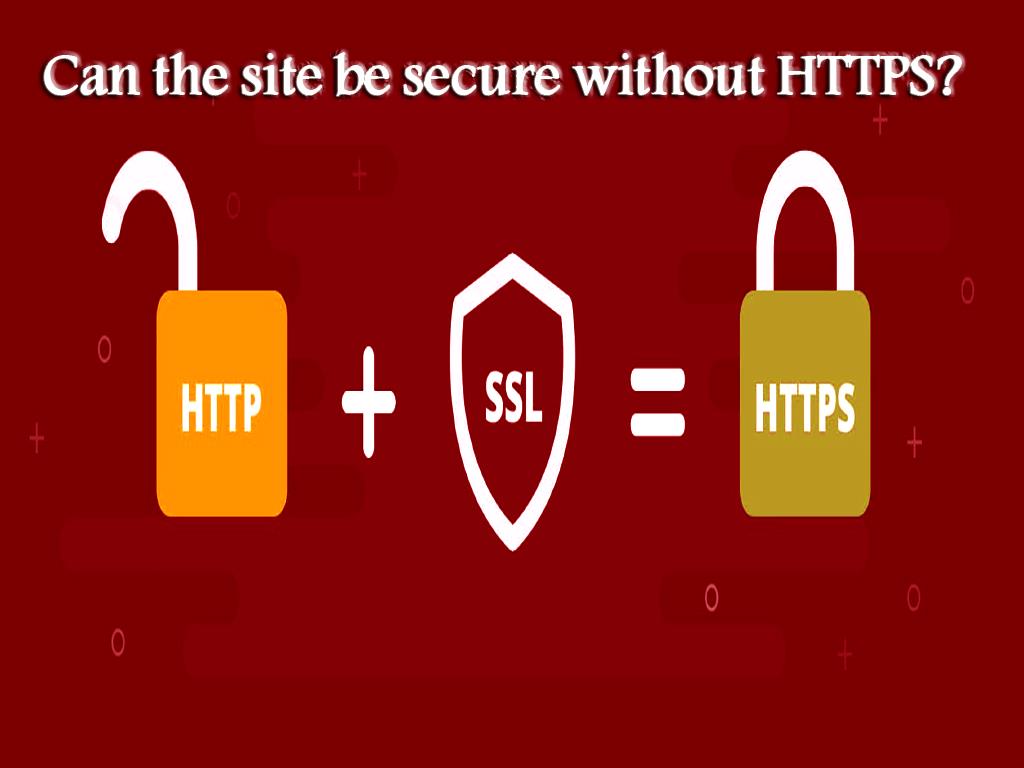
Can the site be secure without HTTPS?

As you know, the security of a site and the information it contains, as well as the security of the information of users which is entered the site by them, is of a great importance and all site owners try to create a safe and secure site in every step of designing a site.

Hypertext Transfer Protocol is one of the most common protocols that sites use to transfer information, but it does not provide high security for the site and the question comes to users’ mind is that whether such sites can be secure or not, or the things that can be done to secure the site, as well as thousands of other questions, some of which we will answer below. Hypertext Transfer Protocol Secure (HTTPS) is a protocol that is more secure than the HTTP protocol, and many browsers have declared that sites without HTTPS are not secure, so users who are looking for answers to their questions on the Internet would initially pay attention to the site address and if it doesn’t contain HTTPS, they do not prefer to use it in order to meet their needs, as a result they will look for another site that has high security, because if there is the need of entering their personal information to register on the site, they would prefer not to be worried about their loss of their information, due to the fact that if they choose an unsafe website there will be the possibility of being hacked and all of their information will be stolen.

If you are one of the people who have not used HTTPS yet, it is better to reconsider, and you will come to the conclusion by reading the rest of this article, that sites without this protocol cannot be safe.

The world of hacking has expanded these days, therefore there are lots of hackers who do researches and try to make progress in this field, so that they can easily hack your site and abuse your information, which is why you, as a web designer, must work to increase the security of your site, so that over time you can gain the trust of search engines and increase your site's ranking in the Google search results page, and ultimately many users will be attracted to your site because of its safety.


Can the site be secure without HTTPS?
According to the information we have given you so far, the answer to this question, is definitely no, HTTPS uses Secure Sockets Layer to encrypt all the data which should be transmitted between web servers and web browsers, thus the security increases and information such as user password will not be easily available to hackers.

If you want to reach a high level of site security without using the HTTPS protocol, you have to spend a lot of time and energy, but despite this effort it may not work, and you cannot create a secure site, the use of HTTPS has become very common there days and almost everyone uses this protocol and all the tips that are necessary to be implemented in order to increase the security of the site , as well as optimizing it, so they try their best to achieve a high ranking in Google search results, we will discuss this topic in more detail below.

Tips that make site owners not to design a site without HTTPS:
-” Unsecure website” warning:
From 2017, the Google Chrome web browser has started displaying “unsecured” alerts when a user entered important information on sites which didn’t contain the HTTPS protocol , in 2018, Google Chrome sent this mesغير مجاز مي باشدe after the user logged in to such sites and even when they were not entering their information yet, for this reason, users left such sites and preferred the secure sites to spend their time, which caused site owners not to think of designing a site without using the HTTPS protocol, and follow all the tips to convert their site from HTTP to HTTPS, in order to provide a positive user experience for users.

- HTTPS becomes a factor for site ranking:
As you know, the ranking of a site has a high impact on the success of site owners and there are many factors which are effective in ranking, one of these factors that are considered by search engines and its algorithms is HTTPS, the effect of this factor on the ranking of sites has been proven, and if you want to find out more about this topic, you can do some research, then you will see that all the sites that are shown on the first page of search results, start with an HTTPS URL which confirms the impact of this factor on website ranking.

-The lock icon next to HTTPS in the site address is considered as a sign of standard website:
As you know, sites that use HTTPS are becoming more and more popular among all users and site owners, and almost everyone uses such sites, this statistic shows that, nowadays, people pay more attention to everything and also give great importance to the security of their information, when users see the lock icon, they will come to the conclusion that this site has taken care of the users and has observed the necessary points, so they click on such sites, for example, if you intend to shop online and search for a site that is valid, when there is this lock next to the site address, you will conclude that you have selected the correct site and all your information, such as, bank card number, address, etc., is going to be safe, so you will also recommend the site to others.

In general, the reasons why you should choose the HTTPS protocol:
- You may have just set up a site, and you have a limited budget at the beginning of the way, if this site security is of special importance to you, and you want to achieve a high level of security for your site, despite the low budget, HTTPS can help you, because Hypertext Transfer Protocol Secure is now for free, and you can use it easily.

- This protocol attracts the trust of users and as we mentioned before, users get a good experience from such sites.

- With the development of this protocol, the speed of the site increases because of using this protocol, and as you know, the speed of the site is an important factor for users, due to the fact that they can get the answers to their questions through fast websites.

- One of the factors that can affect the security of the site and provide the site information to hackers, is the use of public Wi-Fi which will provide a security hole which can be attacked by hackers, at this time, using HTTPS will help you to increase the security of the site while using public Wi-Fi.

- As mentioned before, the use of this protocol is effective in ranking.

All these reasons have caused users and site owners not to choose sites without HTTPS at all.

Important points:
While using HTTPS as a web designer to increase the security of your site, you should keep in mind that site security is very complex and in addition to use this for site security, you should also consider other points in order to be able to create a secure site that protects your information as well as the information entered your website by users, and is not accessible to hackers.

To achieve high security, in addition to using HTTPS, you should pay attention to the following points.

- Pay attention to DDOS attacks and take care of your site by raising your awareness in this field.

- Download your software from reputable sources and update all software regularly, because if you do not follow these tips, your site will be easily hacked and using the HTTPS protocol cannot help you in this case.

- There is a possibility of a POODLE attack due to the vulnerability of one of the updated SSLs, through which the hacker can access the transmitted information.

- BEAST attack, which is caused by SSL vulnerability as in the previous case, the hacker decrypts the traffic between the parts and accesses the information.


Last word:
In general, sites that do not use HTTPS are considered as secure sites and users do not trust them, therefore, site designers always use this protocol and pay attention to the fact that in addition to using this protocol, other points should be taken into consideration to increase the security of the site.

Source:https://www.dotnek.com/Blog/Security/can-the-site-be-secure-without-https


برچسب: ، app، application، mobileapp، mobileapplication، mobile، DotNek، monetizing، development، programming، developer، Xamarin، android، Ios، revenue،
ادامه مطلب
امتیاز دهید:
رتبه از پنج: 0
بازدید:

+ نوشته شده: ۲۸ خرداد ۱۴۰۰ساعت: ۰۳:۲۰:۱۲ توسط:Media موضوع: نظرات (0)

Can HTTPS be hacked?

As you know, site security is so critical, and all site owners try to protect their site and information from being hacked by hackers, for this reason, everyone searches for updated news related to site security to make their site more secure day by day, due to the importance of site security, many questions come to the minds of users regarding site security, one of which is related to HTTPS , which we will discuss in this article, but before that it is necessary to HTTP get acquainted with HTTPS.


What is HTTP?
Hypertext Transfer Protocol is one of the most common protocols used to transfer information between web servers and web browsers that uses codes for this transfer which all of them are visible, which decreases the security of using this protocol by site owners, however, despite the low security of using this protocol, most sites prefer this protocol and try to use HTTPS, and increase the security of the site as much as possible.

Then, What is HTTPS?
Hypertext Transfer Protocol Secure is a protocol that, as its suffix implies, is more secure than HTTP, this protocol uses the Secure Sockets Layer to encrypt all the data that is to be transmitted between web servers and web browsers, thus the security increases greatly.

HTTP or HTTPS?
As we mentioned, HTTPS can provide you with more security, and today everyone is looking for this property, also site owners may suggest each other to use HTTPS, and in addition, Google search engine pays more attention to sites that use the protocol, and give a higher ranking to them compared to sites that do not use the HTTPS protocol, which is why many site designers prefer this one, it should be noted that, as you know, the factors that Google's algorithms used to rank sites are unknown, and it has been seen that many sites have not made significant improvements in rankings despite the fact that they are using HTTPS.

In general, using this protocol increases the security of the site , so it is a good reason for people to use it, because high security of a website, causes the attraction of users, as a result this website will attract more attention among competitors, so it ultimately gets a better ranking by doing other site optimization techniques correctly and in principle.

Advantages of using HTTPS protocol:
- Optimize the site and increase the site ranking in the Google search results page

- Increase site security

- Create a positive user experience for the user

- Do not show transfer codes and encrypt them

- Increase the speed of site indexing

- .....

In addition to the benefits that we have mentioned above, this protocol has other benefits, all of which encourage site designers to use this protocol, so it is better to know the way that you can convert your site from HTTP to HTTPS.

Steps to convert website from HTTP to HTTPS:
To convert a site from HTTP to HTTPS, you must first obtain an SSL certificate and then configure your host with an SSL certificate, after these two steps, it is time to convert all internal and external links as well as 301 redirects from HTTP to HTTPS, in the last step, you need to do the necessary update in the content distribution network, and add a new version of your site to Google Search Console and Google Analytic , but the main question that we are going to answer in this article is whether HTTPS can be hacked or not, which we will answer in the following.

Can HTTPS be hacked?
Although HTTPS increases the security of the site , this does not mean that hackers cannot hack it, even after switching HTTP to HTTPS, your site may be attacked by hackers, so in addition to be safe your website in this way, you need to pay attention to other points to be able to turn your site into a secure site.

To answer the question about the possibility of HTTPS to be hacked, we should pay attention to another point, as we have already told you, in the first step of using this protocol, you need to provide an SSL certificate, which is a certificate that increases the security of the site, so if hackers can hack SSL certificate, they can also hack HTTP , which we will discuss more about SSL in the following.

What is SSL?
Secure Socket Layer is for establishing secure communication between the server and the user on the Internet, in fact, this protocol is generally used to increase the security of sites that are using unsafe protocols, SSL causes the data that is going be transmitted to be encrypted, so that it is not abused by hackers during the transfer, in other words, when an attack occurs, such as Man in The Middle, it protects your site information and prevents your information from being hacked, but it does not protect the data stored on the server and, so in order to protect other sections, other existing security holes must be filled.

Tips that can be observed in addition to using SSL to increase site security:
- Keep your site software up to date.

- Pay more attention to server configuration.

- Be careful in choosing the password.

It is also necessary to take other steps that should be considered in creating site security, so that a site can have good security and users can safely put their information in the site.

Can we trust any website that has HTTPS in its URL?
The answer to this question is definitely no, a site that has HTTPS in its address can secure the information that is being transmitted, but it cannot determine the main purpose of the site you are using, so in choosing a site, in addition to the site address, other points should be considered to protect your information from being abused.

In other words, SSL certificates cannot confirm the reliability of the site, because today these certificates are available to everyone and can be gained at a low price or even for free, so to find out whether a site is secure and you can get the answers to the questions or not, you should look at the site ranking, because search engine algorithms, consider many factors to rank the site, and as you know, the purpose of search engines, is to gain user satisfaction, so you can trust sites that have high ranking.

Important note:
Any site that has SSL should not be trusted, because, nowadays, hackers know that if their site address contains HTTPS, they can easily attract users, for instance they try to get your attention to their site by sending mesغير مجاز مي باشدes via an address containing HTTPS, and when you click on the site address, you will enter the site, as a result, they will have full access to all the information, so it is necessary to pay attention to other points and take careful steps to keep your information safe.


Last word:
Site security is very important and to achieve more security, people turn to different strategies, one of which is the use of HTTPS, which we tried to mention the fact that even the most secure protocols may not be able to maintain the security of the site completely, and if you want a secure site, you must follow all the tips at the same time, so that if there is fewer security holes in your site, hackers will not be able to access your information, and even if they hack your website through those few security holes, they can access to less information, as a result it is better not to just focus on the site address and try to prioritize other options for making a website secure because it will work more, so you are able to protect your information from hackers, due to the fact that if they access your information, they will abuse them, and it will make trouble for you, in this article we also tried to mention some of the tips that can be done in addition to HTTP and HTTPS to make your website secure, if you pay attention to all points mentioned above, you can be safe from attacks.

Source:https://www.dotnek.com/Blog/Security/can-https-be-hacked

Youtube:https://youtu.be/OfmTnlCblgU


برچسب: ، app، application، mobileapp، mobileapplication، mobile، DotNek، monetizing، development، programming، developer، Xamarin، android، Ios، revenue،
ادامه مطلب
امتیاز دهید:
رتبه از پنج: 0
بازدید:

+ نوشته شده: ۲۸ خرداد ۱۴۰۰ساعت: ۰۳:۱۸:۱۵ توسط:Media موضوع: نظرات (0)

What are supported platforms in Xamarin.Forms?

Android:
Android is a platform and operating system used and supported by Xamarin.Forms. Android is a platform that can be used to output and design and develop a variety of applications using Xamarin.Forms.

All versions of the Android operating system can be used for output, but with the advancement of technology, versions 5 and above are supported by Xamarin.Forms . In order for the Android operating system to be supported by Xamarin.Forms, we must have the latest versions of Android SDK Tools and Android API platform installed. In building and developing applications for Android projects, the target / compile versions must be set to Use latest installed platform. The lowest version can be API 19, which can easily support devices with Android 5.5 operating system.


iOS:
iOS is the operating system used to build and run a variety of applications. Version 9 and above Version 9 of this operating system is a suitable version for producing and running all kinds of applications .

Windows:
Another platform and operating system that is suitable for running applications produced by Xamarin.Forms , is the Windows operating system. Xamarin.Forms also supports the Windows operating system and can also output to this operating system.

What platforms are supported in Xamarin.Forms?
Applications written using Xamarin.Forms for Android, iOS and Windows operating systems can be launched in the following versions:

- Version 9 or higher for iOS
- Android version 5.5 (API 21) or higher for Android operating system. Of course, it should be noted that this version is the minimum and most basic version to run and launch applications written in Xamarin.Forms.
- Windows 10 Universal Platform version for Windows operating system to launch applications built into Xamarin.Forms

All applications built in Xamarin.Forms are for Android, iOS and Windows operating systems and platforms, but to be able to run and run all of them on these platforms, it is necessary that their versions are in accordance with the versions listed in the section. Be high. Because applications designed using Xamarin.Forms support some platforms and have the ability to run on them.

Of course, to design and develop applications with iOS, you need a Mac system connected to the Internet. The latest and highest version required for the Mac system to design and develop iOS applications is the Xcode version and the lowest and lowest version required to do so is the maغير مجاز مي باشد version. Design, coding and development of different types of applications on different types of platforms and versions are done using Visual Studio.

Version 9 or higher for iOS:
The ninth version of iOS does not have many changes in appearance, but in terms of functionality, it offers many changes and capabilities that users of this operating system have been looking for. Smart features and more powerful spotlight search, new capabilities to control the battery and increase the battery power saving time, adding several default and required applications and applications, etc. are some of the features that are in the ninth version of the iOS operating system. Provided. The addition of these features has enabled Xamarin.Forms to support this version of the operating system, as well as applications designed by Xamarin.Forms can be launched and run in this version of the operating system.

Android 5.5 (API 21):
This version of Android is known as Android Lollipop and is more commonly seen as Android L. This version of the Android operating system has changes and updates to the appearance and structure. The APIs in this version of the operating system allow programmers and application developers to build and develop professional and attractive applications and programs. This version of the Android operating system is suitable for running designed applications and is also supported by Xamarin.Forms, so a suitable version for designing different types of applications by Xamarin.Forms

Windows 10 Universal Platform:
is a technology that is used for all devices with Windows 10 operating system, devices such as PCs, phones, tablets, Xboxes , etc. In this technology, the programmer at once Coding and programming can take different outputs for x86 and x64 processors. The benefits of this version of the Windows operating system are programming based on the device family, not the operating system. In this way, written applications recognize the APIs, behaviors, and modes of the device and can act on the recognition they have made. This version of the Windows operating system is supported by Xamarin.Forms and applications designed by Xamarin.Forms can be easily launched and run in this version of the Windows operating system.

Other platforms and operating systems supported by Xamarin.Forms are as follows:
- Samsung Tizen
- mac OS 10.13 or higher
- GTK
- #WPF

Samsung Tizen:
This operating system is for Samsung, which was introduced in 2012, but it is used on a trial basis, and phones with this operating system have not entered the market. But some smart devices such as Samsung gear2 watch use this operating system and have this operating system. This is an open source operating system, which means that it can be modified and developed for free by many developers around the world. The open source nature of this operating system is an advantage that allows it to be developed for free by skilled developers around the world and made available to users. The user interface of this operating system is almost similar to the Android environment, but compared to Android, it works better than Android in increasing battery life or increasing battery power storage time. Applications designed for this operating system are built on the web. The web-based applications of this system allow applications to work in any environment. Of course, in addition to HTML5, Xamarin.Forms is also used to design, build and develop applications for this operating system. Of course, it should be noted that Tizen operating system is based on the Linux kernel and is not specific to mobile phones and can be used for all smart devices that need the operating system. Smart devices such as refrigerators, washing machines, cars, TVs, wearable gadgets, smart watches, etc. Different types of smart devices that need an operating system for their operation.

maغير مجاز مي باشد 10.13 or higher:
is the latest version provided by Apple, which has made the necessary changes and updates to this version of the operating system and has provided it for the convenience and satisfaction of its users. Another name for this version is maغير مجاز مي باشد High Sierra, which is the fourteenth updated version by Apple. The hardware requirements for this version of the operating system are similar to the hardware requirements for maغير مجاز مي باشد 10.12. This version of Mac OS is supported by Xamarin.Forms and can be used in various cases. Apple has provided some interesting features in this version of the operating system.

Among the interesting features of this version of the operating system are the following:
- It is possible to search Powerful Spotlight in mails in this version of the operating system, and users can search among their mails in the form of Powerful Spotlight.
- Safari blocks all ads, auto-play videos, and all sorts of annoying things.There are more advanced features in the photos program for editing photos, and users can easily use this feature using this version of the operating system and edit their images in an advanced and easy way.Can also support external and external graphics cards.

GTK #:
A library built using the C programming language to provide high quality and fast tools for user interface design. This library contains tools that are used to design a variety of user interfaces in C and can be used under other languages ​​such as C ++ or python. One of the features of this library is that it is multi-platform and can easily be used in other environments and platforms. Xamarin.Forms also supports this library and can be used to build and develop multi-platform applications.

Windows Presentation Foundation:
WPF, which is used to design graphical interfaces. Without graphical interfaces, it was possible to build and design all kinds of applications and software using coding, but with graphical interfaces, the process of making and developing has become easier because there is no need for much coding. WPF is based on DirectX. The latest Microsoft technology to design a variety of graphical interfaces for the convenience of users and developers, is a platform supported by Xamarin.Forms and can be used to build and develop a variety of applications.

What platforms are not supported by Xamarin.Forms?
There are also some platforms that are obsolete and not supported by Xamarin.Forms. These types of platforms are as follows:

- Windows 8.1 / Windows Phone 8.1 WinRT
- Windows Phone 8 Silverlight


Why are these platforms obsolete and not supported by Xamarin.Forms?
- Windows Phone and Android are both designed and built for the same purpose and task, but they have differences that make Android superior to Windows Phone, which is why Xamarin.Forms chooses the Android platform for support. And does not support the Windows Phone platform.
- In Android, widgets and applications are located in a home screen that allows more regular and easy access to applications, and most importantly in Android, users can change their layout at will. In Windows Phone, all programs are tiled. Android is more flexible in terms of personalization than Windows Phone, which is why Android is superior to Windows Phone and has been supported by Xamarin.Forms.
- The contacts and contacts section in Android is in the same application and next to each other, and this makes the call process easier, but in Windows Phone, the contacts and contacts section are not next to each other, which is one of the reasons why Android is superior to Windows Phone. And be selected for support by Xamarin.Forms.

Source:https://www.dotnek.com/Blog/Apps/what-are-supported-platforms-in-xamarinforms


برچسب: ، app، application، mobileapp، mobileapplication، mobile، DotNek، monetizing، development، programming، developer، Xamarin، android، Ios، revenue،
ادامه مطلب
امتیاز دهید:
رتبه از پنج: 0
بازدید:

+ نوشته شده: ۲۸ خرداد ۱۴۰۰ساعت: ۰۳:۱۴:۴۸ توسط:Media موضوع: نظرات (0)

How to store data in a local SQLite.NET database in Xamarin?

In this tutorial you will learn:
- How to store data in the local Xamarin database ?

- How to use a NuGet Package Manager to add a NuGet Package?

Note: In order to be able to do this project, you must have already successfully completed the project of building multi-page applications .


How to use local storage in Xamarin Forms using Visual Studio?
1- Open Visual Studio
2- Open the Notes solution project.
3- In the Solution Explorer section, select the Notes project and right-click on it.
4- After right-clicking on the project, select Manage NuGet Packages.
5- In the NuGet Package Manager section, select the Browser tab to search.
6- Search for the SQLite-net-plc. package in NuGet , and after finding it, click Install to add it to the project.

Note:
There are packages with similar names, the package you should choose has the following specifications:

- Author (s): Frank A. Krueger
- Id: SQLite-net-plc.
- NuGet link: SQLite-net-plc.

- Open the Models folder in the Solution Explorer section of the Note.cs project and delete the existing code and enter the following code there.

using System;
using SQLite;


namespace Notes. Models
{
public class Note
{
[PrimaryKey, AutoIncrement]
public int ID {get; set;}
public string Text {get; set;}
public DateTime Date {get; set;}
}
}

These codes define the Note model, which is used to store note data in applications .

Each note in the SQLite.NET database has its own unique id, in fact the ID, PrimeryKey, and AutoIncrement attributes make each note have its own id.

1- Record the changes made and exit that window.
2- Create a folder called Data in the Solution Explorer section and add it to the Notes project.
3- In the folder created in the Notes project and in the Solution Explorer section, create a class called NoteDatabase.
4- In the created NoteDatabase.cs class, delete all existing codes and replace the following codes.

using System.Collections. Generic;
using System.Threading. Tasks;
using SQLite;
using Notes.Models;

namespace Notes.Data
{
public class NoteDatabase
{
readonly SQLiteAsyncConnection _database;
public NoteDatabase (dbPath string)
{
_database = new SQLiteAsyncConnection (dbPath);
_database. CreateTableAsync (). Wait ();
}

public Task > GetNotesAsync ()
{
return _database. Table (). ToListAsync ();
}

public Task GetNoteAsync (int id)
{
return _database. Table ()
. Where (i => i.ID == id)
. FirstOrDefaultAsync ();
}

public Task SaveNoteAsync (Note note)
{
if (note.ID! = 0)
{
return _database. UpdateAsync (note);
}
else
{
return _database. InsertAsync (note);
}
}

public Task DeleteNoteAsync (Note note)
{
return _database. DeleteAsync (note);
}
}
}

The code written in this class is used to create a database, read data, write and add data and delete it.

Constructor This class receives the address of the file in which the database was created and stored as an argument. The address of the file in which the database was created and stored is provided by the App class. Asynchronous SQLite.NET APIs in these classes are used to transfer database calculations to the background thread.

- Click on the App.xaml.cs section in the Solution Explorer of the Notes project and replace the code in the file with the code below.

using System;
using System.IO;
using Xamarin.Forms;
using Notes.Data;


namespace Notes
{
public partial class App: Application
{
static NoteDatabase database;
public static NoteDatabase Database
{
get
{
if (database == null)
{
database = new NoteDatabase (Path.Combine (Environment.GetFolderPath (Environment.SpecialFolder. LocalApplicationData), "Notes.db3"));
}
return database;
}
}

public App ()
{
InitializeComponent ();
MainPage = new NavigationPage (new NotesPage ());
}

protected override void OnStart ()
{
// Handle when your app starts
}

protected override void OnSleep ()
{
// Handle when your app sleeps
}


protected override void OnResume ()
{
// Handle when your app resumes
}
}
}

By entering this code, you create a database that creates a NoteDatabase instance as a singleton and also receives its filename as an argument and sends it to the NoteDatabase constructor. Creating a database as a singleton has the advantage that only one connection is created and used to communicate with the database with the same connection.

- Save the changes made and exit that window.

- Click on the NotePage.xaml.cs section in the Solution Explorer of the Notes project and replace the code listed below with the OnAppearing method with the code inside the file.

protected override async void OnAppearing ()
{
base. OnAppearing ();
listView.ItemsSource = await App.Database. GetNotesAsync ();
}

By entering this code, you will collect the notes stored in the database. In other words, this code collects all the notes stored in the database.

- Save the changes you made and exit that window.
- Click on NoteEntryPage.xaml.cs in the Solution Explorer section and enter the following code inside it:

async void OnSaveButtonClicked (object sender, EventArgs e)
{
var note = (Note) BindingContext;
note. Date = DateTime.UtcNow;
await App.Database. SaveNoteAsync (note);
await Navigation.PopAsync ();
}

async void OnDeleteButtonClicked (object sender, EventArgs e)
{
var note = (Note) BindingContext;
await App.Database. DeleteNoteAsync (note);
await Navigation.PopAsync ();
}

NoteEntryPage maintains an instance of a Note.

When the OnSaveButtonClicked method is executed, the Note instance is stored in the database and the application returns to the previous page.

When the OnDeleteButtonClicked method is executed, the Note instance is removed from the database and the application returns to the previous page.

How to use sqllite.net as a local storage in Xamarin Form using Visual Studio for Mac?
1- Open Visual Studio
2- Open the Notes solution project.
3- In the Solution Pad section, select the Notes project and right-click on it.
4- After right-clicking on the project, select Add> Add NuGet Packages.
5- In the NuGet Package Manager section, select the Browser tab to search.
6- And search for NuGet SQLite-net-plc. and after finding it, click Add Package to add to the project.

Note:
There are packages with similar names, the package you should choose has the following specifications:

- Author (s): Frank A. Krueger
- Id: SQLite-net-plc.
- NuGet link: SQLite-net-plc.

- Open the Models folder in the Solution Pad section of the Note.cs project and delete the existing code and enter the following code there.

using System;

using SQLite;


namespace Notes.Models

{

public class Note

{

[PrimaryKey, AutoIncrement]

public int ID {get; set;}

public string Text {get; set; }

public DateTime Date {get; set;}

}

}

These codes define the Note model, which is used to store note data in applications.

Each note in the SQLite.NET database has its own unique id, in fact the ID, PrimeryKey, and AutoIncrement attributes make each note have its own id.

- Record the changes made and exit that window.
- Create a folder called Data in the Solution Pad and add it to the Notes project.
- In the folder created in the Notes project and in the Solution Pad section, create a class called NoteDatabase.
- In the created NoteDatabase.cs class, delete all existing codes and replace the following codes.

using System.Collections. Generic;
using System.Threading. Tasks;
using SQLite;
using Notes.Models;
namespace Notes.Data
{
public class NoteDatabase
{
readonly SQLiteAsyncConnection _database;
public NoteDatabase (dbPath string)
{
_database = new SQLiteAsyncConnection (dbPath);
_database. CreateTableAsync (). Wait ();
}

public Task > GetNotesAsync ()
{
return _database. Table (). ToListAsync (async (Note note)
{
return _database. DeleteAsync (note);
}

}

}


The code written in this class is used to create a database, read data, write and add data and delete it.

Constructor This class receives the address of the file in which the database was created and stored as an argument. The address of the file in which the database was created and stored is provided by the App class. Asynchronous SQLite.NET APIs in these classes are used to transfer database calculations to the background thread.

- Click on the App.xaml.cs section in the Solution Pad of the Notes project and replace the code inserted in the file below with the code inside it.

using System;
using System.IO;
using Xamarin.Forms;
using Notes.Data;


namespace Notes
{
public partial class App: Application
{
static NoteDatabase database;
public static NoteDatabase Database
{
get
{
if (database == null)
{
database = new NoteDatabase (Path.Combine (Environment.GetFolderPath (Environment.SpecialFolder. LocalApplicationData), "Notes.db3"));
}
return database;
}
}
public App ()
{
InitializeComponent ();
MainPage = new NavigationPage (new NotesPage ());
}

protected override void OnStart ()
{
// Handle when your app starts
}


protected override void OnSleep ()
{
// Handle when your app sleeps
}

protected override void OnResume ()
{
// Handle when your app resumes
}
}
}

By entering this code, you create a database that creates a NoteDatabase instance as a singleton and also receives its filename as an argument and sends it to the NoteDatabase constructor. Creating a database as a singleton has the advantage that only one connection is created and used to communicate with the database with the same connection.

- Save the changes made and exit that window.
- Click on the NotePage.xaml.cs section in the Solution Pad of the Notes project and replace the code listed below with the OnAppearing method with the code inside the file.

protected override async void OnAppearing ()
{
base. OnAppearing ();
listView.ItemsSource = await App.Database. GetNotesAsync ();
}

By inserting this piece of code, you will collect the notes stored in the database. In other words, this code collects all the notes stored in the database.

- Save the changes you made and exit that window.
- Click on NoteEntryPage.xaml.cs in the Solution Pad and enter the following code inside:


async void OnSaveButtonClicked (object sender, EventArgs e)
{
var note = (Note) BindingContext;
note. Date = DateTime.UtcNow;
await App.Database. SaveNoteAsync (note);
await Navigation.PopAsync ();

}

async void OnDeleteButtonClicked (object sender, EventArgs e)
{
var note = (Note) BindingContext;
await App.Database. DeleteNoteAsync (note);
await Navigation.PopAsync ();
}

NoteEntryPage maintains an instance of a Note.

When the OnSaveButtonClicked method is executed, the Note instance is stored in the database and the application returns to the previous page.


 Source:https://www.dotnek.com/Blog/Apps/how-to-store-data-in-a-local-sqlitenet-databa


برچسب: ، app، application، mobileapp، mobileapplication، mobile، DotNek، monetizing، development، programming، developer، Xamarin، android، Ios، revenue،
ادامه مطلب
امتیاز دهید:
رتبه از پنج: 0
بازدید:

+ نوشته شده: ۲۸ خرداد ۱۴۰۰ساعت: ۰۳:۱۱:۳۴ توسط:Media موضوع: نظرات (0)

Getting started with Xamarin.Forms and How to Install Xamarin on Visual Studio

To install Xamarin on different types of old and new versions of Visual Studio, which is free and does not require any additional and separate permissions, you can use the Visual Studio installer tool, which simplifies the process of installing Xamarin on Visual Studio.


What technologies do we need to install Xamarin on Visual Studio?
Here are the requirements to install Xamarin on Visual Studio :

1- Windows operating system with version 7 or higher
2- Visual Studio software with version 2015 or 2017 or higher (Enterprise, Professional or Community)
3- Xamarin file for installation on Visual Studio

Note:
If you are using the Visual Studio Express version , Xamarin may not be compatible with that version of Visual Studio because some plugins are not supported.

Steps to install Xamarin on Visual Studio:
To build applications with Xamarin with programming in Visual Studio with C # programming language, Xamarin must be installed as part of Visual Studio so that it can be easily accessed and programmed.

1- In the first step, if you do not have Visual Studio installed, you must download and install it from the main and valid Visual Studio homepage. Download versions depend on your wishes. Download Visual Studio Community, Visual Studio Professional or Visual Studio Enterprise. Visual Studio download https://visualstudio.microsoft.com/downloads/
2- After downloading the Visual Studio file, select and download the downloaded package option to install it.
3- Next, the Mobile development with .NET option will appear on the installation page, select it and click on it.
4- After clicking the Mobile development with .NET option, pay attention to the Summary section on the right, and in this section, all the items that are installed with Visual Studio are displayed. Items such as Xamarin Profiler, Xamarin Workbooks, Java SE Development Kit , Android NDK, Android Emulator ... will be installed with Visual Studio.
5- After reviewing and preparing other items, click on the install option to finally install Visual Studio on your system. The time it takes to prepare and install Visual Studio depends on the version. This means that depending on the type of Visual Studio you have chosen to install, the preparation and installation process will take some time.
6- After completing the Visual Studio installation process, click the Launch option to set up and prepare Visual Studio.

Now that Visual Studio is installed on your system, to build mobile applications on different types of platforms, it is time to install and launch Xamarin in Visual Studio. After installing Visual Studio, Xamarin should be installed for programming and building applications.

How to add Xamarin to Visual Studio 2015?
To add Xamarin to Visual Studio 2015 on Windows, you must follow these steps:

1- Click on Windows Start, then select Windows Start to continue the process.
2- In the Windows Start section, right-click on the Microsoft Visual Studio option and select Change.

3- After selecting the Change option, the Visual Studio Installer window will appear, select the Modify button in this window.

4- In the Features section, scroll down to reach the Cross Platform Mobile Development section. In this section, you can select the Xamarin option with your preferred version of C # / .NET (Xamarin).

5- To add Xamarin to Visual Studio, you must select the desired version of Xamarin and then click the UPDATE option.

If you follow these steps in order and carefully, you can install Xamarin in Visual Studio version 2015 and then start programming and building the application .

How to ensure the correct installation of Xamarin in Visual Studio?
To confirm the installation steps of Xamarin on Visual Studio, it is better to pay attention to the following:

Confirmation of Xamarin installation in the 2017 version of Visual Studio:
1- Launch Visual Studio 2017.
2- At the top of the toolbar, click Help.
3- In this section, if Xamarin is installed and set up correctly, an additional option called Xamarin will appear in this section. This means confirming the installation of Xamarin in Visual Studio 2017 by adding the Xamarin option in the Help section of Visual Studio.

Confirm Xamarin installation in other versions of Visual Studio:
1- Launch Visual Studio with any version.
2- At the top of the toolbar, click Help.
3- In the Help section, click the last option, which is the About Microsoft Visual Studio option.
4- If in this section, among the installed lists, there is also a Xamarin installation list, it means that the Xamarin installation process has been done correctly and is ready for programming.

What is Xamarin.Forms?
Xamarin.Forms is actually the user interface or UI that was designed and created for the convenience of application developers. Application developers using Xamarin.Forms can easily program in Visual Studio with C # programming language on several platforms of Android, iOS and Windows Phone and develop native applications. The APIs in Xamarin.Forms can be used to design and build different types of native applications on various platforms such as Android , iOS and even Windows.

Techniques for creating a UI in Xamarin.Forms:
1- Creating a UI in the source code using the APIs provided by Xamarin.Forms itself.
2- Using XAML scalable markup language software, which was designed by Microsoft itself as a markup language, for UI design

In the second method to create the UI, the code related to creating the user interface is stored in an XAML file in XAML format, but its behavior at runtime is stored separately in a code-behind file.

Methods of designing and building native applications using Xamarin in Visual Studio:
There are two ways to design and build native and multi-platform applications using Visual Studio:

- Forms technology:
In this method, a user interface is designed visually, which is used to design applications , and by using this user interface, minor changes can be made in the common code between platforms. It should be noted that UI codes and backend codes are common to all platforms.
- Xamarin native:
In this method, using Xamarin. Windows, Xamarin.Android and Xamarin. iOS libraries, you can code and build an application for each of the platforms separately.

Note:
In using Xamarin form, the codes written in all platforms are shared and only by applying a small change in them, different outputs can be obtained simultaneously and using common codes.

What can the Xamarin.Forms platform be used for?
To design applications where shared source code is more important than its user interface.Do not need the capabilities of special platforms to design applications.To design applications that are used to enter data and information.Also used for easy designs using XAML.For sharing UI design templatesTo create and design several native applications by sharing the written code of C # programming language, on different platforms of Android, iOS and Windows

How to run the program in Xamarin Form?
How to run the program in Xamarin Form is that all pages and controls are related to the native user interface on their own platform. This means that running the app on the Android platform is different from iOS, although they have the same code. Xamarin Form will appear on the iOS platform as UITextView, on the Android platform as EditText and on Windows as Textbox.

What is the difference between Xamarin Form and Xamarin?
One of the misconceptions that most people have is that they think Xamarin is the same as Xamarin form, but in fact they are very different from each other and even their functions are different. One of the important differences is that using Xamarin can be programmed separately for each of the Android and iOS platforms, but in using Xamarin form, different outputs of the platform can be programmed and programmed at the same time. Various Android and iOS. In using Xamarin to build native applications on different platforms, separate coding must be done and it is not possible to share the code in Xamarin.Forms, but by sharing the code in Xamarin, the form can be coded only once and took various outputs simultaneously.


Why use Xamarin.Forms to design and build native applications?
1- The programming language for building and designing all native applications on all platforms is C #, and for outputs on various platforms, there is no need to re-code.
2- The basis of all platforms are equal and with just a little change of code and sharing them, different outputs can be obtained in different platforms.
3- Xamarin.Forms has access to all .Net libraries, and in programming with Xamarin, you cannot access the .NET library.
4- It is easier to manage and maintain applications designed using Xamarin.Forms, because when you want to update the application or make changes to it, you have to change the source code. Because the code in the source is very close to the code of different platforms, it is easier to maintain and manage them.
5- Xamarin.Forms can also be used effectively to test a variety of applications designed on all platforms. In this case, Xamarin.Forms provides some tools for developers to use them to test the application on real mobile devices and solve their problems.

Source:https://www.dotnek.com/Blog/Apps/getting-started-with-xamarinforms-and-how-to


برچسب: ، app، application، mobileapp، mobileapplication، mobile، DotNek، monetizing، development، programming، developer، Xamarin، android، Ios، revenue،
ادامه مطلب
امتیاز دهید:
رتبه از پنج: 0
بازدید:

+ نوشته شده: ۲۸ خرداد ۱۴۰۰ساعت: ۰۳:۰۸:۲۴ توسط:Media موضوع: نظرات (0)

The ways to protect yourself from these malwares

Protecting the important information that exists in computer systems has become a very important issue today, and many people are trying to harm the security of information in different ways, as well as using the information contained in other people's computers in order to achieve their desired results, as you know, there are profiteers who use different factors to achieve their desires, one of which is the use of malwares, which we will look at different types of it, as well as ways to protect information against them.

What is Malware?
 In fact, malware is a type of code that will ultimately disrupt your information security system and allow profiteers to gain access to other people's information through different devices, once a system is infected with malware, different things may happen to that, for example spam emails may be sent by the infected system or all passwords may be stolen as well as other things that may happen.

In general, security holes have the worst effect because if they exist, different types of malware can penetrate the system.

- Adware:
This type of Malware is a program that users do not want to see, but are displayed to the user without their consent.

So far you are familiar with a number of Malwares, and it is time to get acquainted with the ways in which you can protect your system and your information against these Malwares, here are some of these ways.

The ways to protect yourself from these malwares:
There are many reports of phone scams today, in which people call users with malicious intent and offer to help protect their system against malwares, but in fact they have other purposes of contacting you and their ultimate goal is to infect the system.

These people may also ask you to pay them in order to protect your system, and once you do so, they won’t protect your information, and they may introduce viruses into your system themselves to eventually infect your system, in general, the following ways can help you in this way:

- keep all the software in your system up to date:
When software is created by designers, it may have bugs that, once released, manufacturers will check for bugs in that software after each update to fix any security holes, according to the points which have mentioned, one of the ways in which you can protect the system from malware, is to constantly update the software in the system, so that you can greatly increase system security .

- Do not miss the pop-up windows:
Such windows open spontaneously without clicking on anything, and may cause the viruses to enter your system if you click on them, so you should be careful while working with the Internet, so you have to be careful not to click on anything at all and get out of them quickly if you encounter such cases, nowadays, it is also the possibility of using a pop-up blocker to prevent the future dangerous events from happening, as a result you can reduce possible problems.

- Be careful while opening suspicious emails:
One of the methods that hackers use to log in to users' systems, is to send spam emails that eventually infect them, spam emails often have an attractive appearance and attract users to click on them which will eventually cause them to fall into the trap of hackers as a result the information of the system will be stolen, so you should always be careful while working with the system and never open such emails to avoid the bad consequences.

- Disable auto-update:
Most systems have automatic updates, and these same updates may cause a harmful software to be downloaded which can damage the system.

- Use a firewall:
Search for “check firewall” in the Start Menu and click on “check firewall status” among the displayed results, this feature protects your system from unwanted Internet threats, you have to check whether the firewall is active or inactive constantly, and activate it quickly if it is inactive in order to increase the security of your system .

- Be careful in choosing the password:
Password is of a great importance in increasing the security of the system and if you try to choose an easy one, or the one which is not chosen correctly, it can cause a lot of damage to the system, some people use their name, their child's name, year of birth and family members, etc., as a password, all of which can be easily detected by hackers, so that they can easily log in and have access to your information in order to abuse them and achieve their desired results.

If a password contains at least 8 characters and uses a combination of uppercase and lowercase letters as well as numbers and other characters, it can be considered as a suitable one, so that it takes a long time to guess, or it is generally impossible to guess.

- Back up all your data:
In general, to protect the security of the site against any threat, you should always follow the tips that can increase the security of the site, the same is true for malwares, in order to do so, you should make a back-up of your data, especially the important one, so that you can access your data if something happens to it.

If you have not backed up your data yet, it is time to make a back-up of it quickly, so that you can make sure that your data will be protected.

- Install the appropriate antivirus:
One of the things that can protect the information in your system against various types of malware is the installation of a suitable and strong antivirus, there are many antivirus programs that can be used for free to increase the security of the site which block the entry of viruses to user’s systems, so it is necessary for every user to install a perfect one.


Last word:
In general, improving the security of the site against infection by malwares is very important and one of the main causes of users’ concerns is to protect their information and system against such infections, in this article, a number of types of malwares as well as the ways that people can use to protect them against such infections have been mentioned, so that you can use them to increase the security of your system as much as possible, as a result if you pay attention to the mentioned points, you can find the solutions of protecting your system from malwares because they can damage your system as much as possible, and you may have no solution after being attacked by malwares, so it is better to prevent the possible damages from happening.

Source:https://www.dotnek.com/Blog/Security/the-ways-to-protect-yourself-from-these-malwa

Youtube:https://youtu.be/zvOfuUFMqVc


برچسب: ، app، application، mobileapp، mobileapplication، mobile، DotNek، monetizing، development، programming، developer، Xamarin، android، Ios، revenue،
ادامه مطلب
امتیاز دهید:
رتبه از پنج: 0
بازدید:

+ نوشته شده: ۲۸ خرداد ۱۴۰۰ساعت: ۰۳:۰۶:۵۷ توسط:Media موضوع: نظرات (0)